Device Settings Homepage
The Device Settings homepage allows you to view and manage the devices attached to an organization, add or delete devices, check device status, and customize the look and feel of your devices.
Note
If you have multiple organizations, you will need to switch between them to view all devices associated with your account.
Your organization's devices are listed here, with the most important items viewable at a glance: status, type, plan, expiration date, device ID, IP address, assigned template, and current firmware.
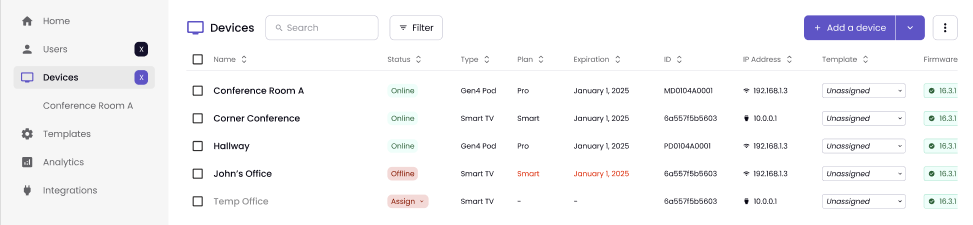
Status messages and their meanings are below:
Assign: The device does not have an assigned plan.
Online: The device is responding to the Polaris Cloud and is available.
In Use: One or more users are connected to the display.
Sharing: One or more users are actively sharing to the display.
Offline: The device is not responding to the Polaris Cloud.
If you are having problems managing an offline device, see Troubleshooting Offline Devices for more information.
More information on managing devices, such as adding and deleting, is available here.
Device
Once you select a device, you will go to that device's information and settings page.
At the top is the device's name and status, followed by several hardware settings:
Type of device
Plan the device is assigned to
The device's ID number
The connection type, such as wireless.
IP address
MAC Address
Current version
The page also includes Update and Reboot buttons for that device.

Under this information, there are four tabs to customize your device's settings: