Networking
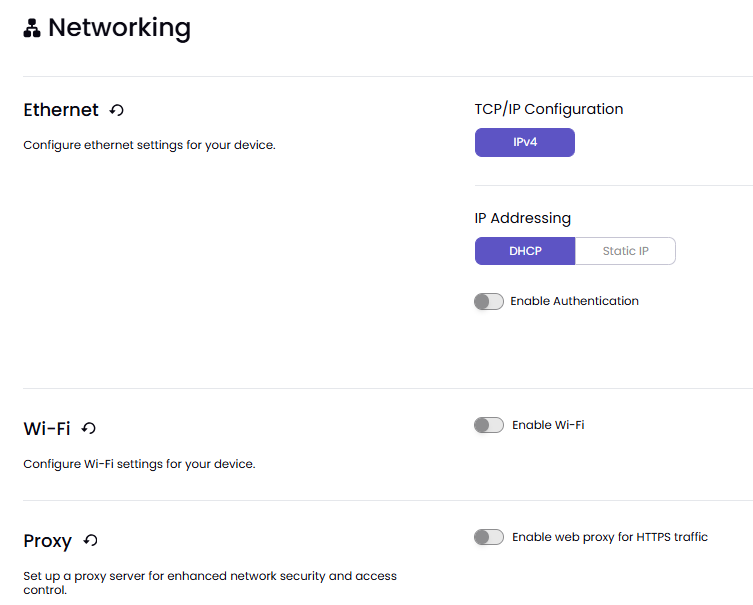
In the Networking section, you configure various settings for your device. You can use a wired Ethernet connection, connect to a Wi‑Fi network, or route network traffic through a proxy server.
Note
See Network Implementation Considerations for more information.
Ethernet
You can configure the device's wired network connection.
TCP/IP Configuration
Select the Internet Protocol (IP) version used for the network connection.
IPv4: Uses Internet Protocol version 4 for network communication.
IP Addressing
Choose how the device receives its network settings.
DHCP: Automatically obtains an IP address and network settings from the network's DHCP server.
Static IP: Allows you to manually enter the device's IP address and network settings.
Enable Authentication
Enable authentication for wired network connections if required by your organization's network policies.
Wi‑Fi
Here you can configure the device's wireless network connection.
Enable Wi‑Fi
Turn Wi‑Fi on to allow the device to connect to a wireless network.
Network Name (SSID)
Enter the name of the wireless network you want the device to join.
Security Type
Select the security method used by the wireless network.
WPA2-Personal: Uses a shared password to authenticate devices.
WPA2-Enterprise: Uses enterprise authentication and typically requires credentials provided by your organization.
Password
Enter the password or passphrase required to connect to the selected wireless network.
TCP/IP Configuration
Select the IP version used for the wireless network connection.
IPv4: Uses Internet Protocol version 4 for network communication.
IP Addressing
Choose how the device receives its network settings.
DHCP: Automatically receives an IP address and network settings from the network.
Static IP: Allows you to manually configure the device's network settings.
Enable Authentication
Enable additional network authentication when required by your wireless network or organization.
Proxy
You can configure a proxy server to control how the device connects to web-based services.
Enable Web Proxy for HTTPS Traffic
Route secure HTTPS traffic through a proxy server. When enabled, enter the proxy settings provided by your network administrator to support network security, monitoring, or access-control requirements.