Network Implementation Considerations
Consult your IT or network administrator for guidance and implementation. The scenarios provided are intended only to demonstrate the connectivity requirements for Mersive devices. Additional rules are required for normal Internet access beyond these examples. The order of the rules determines which ones are considered, from top to bottom, until one is matched. If using DHCP, DNS is typically acquired from the router. In some cases, DNS may require outbound port 53 to the Internet.
Scenario 1: Basic Firewall Configuration for a Single Network
This example allows access to Mersive devices locally and, optionally, from the Internet on most home or small-office routers. External guests can interact with Mersive devices in this configuration only when provided with the code on the screen.
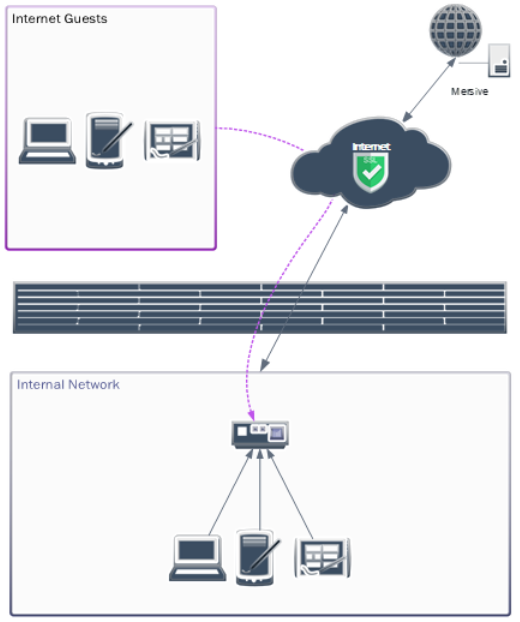
NAT Statement Examples
200.200.200.1/29 = Office WAN
192.168.0.1/24 = Office LAN
Note
Most home and small-office networking equipment establishes the following dynamic NAT statement by default and supports STUN NAT traversal.
# NAT Traffic Inside to Outside
SOURCE NAT 192.168.0.0/24 to 200.200.200.1
Firewall ACL Rule Examples
# Allow individual or range for Mersive device(s) and client(s) traffic to the Internet
ALLOW FROM 192.168.0.0/24 UDP 123 TO ntp.mersive.com UDP 123
ALLOW FROM 192.168.0.0/24 TCP-UDP 49152–65535 TO ANY TCP-UDP 443
ALLOW FROM 192.168.0.0/24 TCP-UDP 19302 TO stun.l.google.com TCP-UDP 19302

# [OPTIONAL] Allow DNS from internal networks to Internet if sourced from the Internet instead of router or internal DNS server (e.g. 8.8.8.8 – Google DNS)
ALLOW FROM 192.168.0.0/24 TCP-UDP 53 TO ANY TCP-UDP 53

# [OPTIONAL] Allow specific domain HTTPS and STUN traffic between internal networks and Internet (if supported) [replaces “ANY TCP-UDP 443” above]
ALLOW FROM 192.168.0.0/24 TCP-UDP 49152–65535 TO app.mersive.com TCP-UDP 443

# [OPTIONAL] Add to allow sharing traffic for Internet guest access to one device or range of devices (/32 = 1 device, /27 = 30 devices)
ALLOW FROM 192.168.0.224/27 UDP 32768-65535 TO ANY UDP 32768-65535
ALLOW FROM ANY UDP 32768-65535 TO UDP 192.168.0.224/27 32768-65535

# [OPTIONAL] Deny all other traffic to and from the network hosting Mersive Devices. This may exist as a default on your firewall.
DENY ALL FROM ANY TO ANY
Scenario 2: Firewall Configuration Across Two VLANs With Optional Sharing to Mersive Devices from Internet-based Guests
This example allows access to Mersive devices on two VLANs, optionally from the Internet. In this configuration, internet guests can interact with Mersive devices only when provided with the code on the screen.
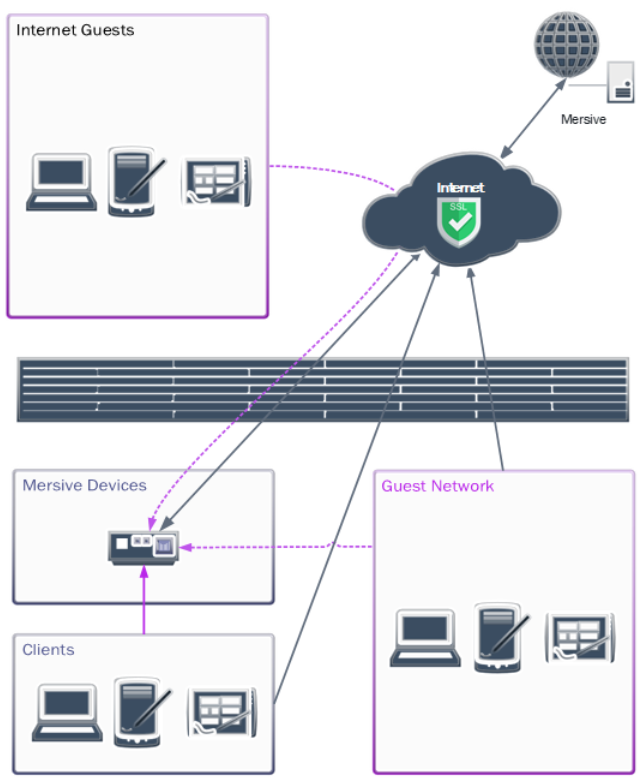
NAT Statement Examples
VLAN10 = Client LAN [10.0.1.1/24]
VLAN20 = Mersive Device LAN [10.0.2.1/24]
Note
Some firewalls may require updates or do not fully support STUN NAT forwarding. In Palo Alto firewalls, enable Persistent Dynamic IP and Port (DIPP) NAT forwarding. For Cisco IOS, this may require configuring STUN peering. Cisco Meraki routers fully support STUN. In highly restrictive networks, additional configurations or static port mapping may be required.
# NAT Traffic Inside to Outside Internet
SOURCE NAT VLAN10 to OUTSIDE-INTERFACE
SOURCE NAT VLAN20 to OUTSIDE-INTERFACE

# NAT or Route Traffic between VLANs
SOURCE VLAN10 to VLAN20
SOURCE VLAN20 to VLAN10
Firewall ACL Rule Examples
# Allow traffic from Mersive device and client hosting networks to the Internet
ALLOW FROM VLAN10, VLAN20 UDP 123 TO OUTSIDE ntp.mersive.com UDP 123
ALLOW FROM VLAN10, VLAN20 TCP-UDP 49152–65535 TO OUTSIDE ANY TCP-UDP 443
ALLOW FROM VLAN10, VLAN20 TCP-UDP 19302 TO OUTSIDE stun.l.google.com TCP-UDP 19302

# Allow sharing traffic between Mersive device and client hosting networks
ALLOW FROM VLAN10 TCP 32768-65535 TO VLAN20 7000-7001, 7100, 7236, 8008-8009, 8443
ALLOW FROM VLAN10 UDP 1900, 5353 TO VLAN20 UDP 1900, 5353
ALLOW FROM VLAN10 TCP-UDP 32768-65535 TO VLAN20 TCP-UDP 32768-65535
ALLOW FROM VLAN20 UDP 1900, 5353 TO VLAN10 UDP 1900, 5353
ALLOW FROM VLAN20 TCP-UDP 32768-65535 TO VLAN10 TCP-UDP 32768-65535

# [OPTIONAL] Allow DNS from internal networks to Internet if sourced from the Internet or from a server on another VLAN (e.g. 8.8.8.8 – Google DNS)
ALLOW FROM VLAN10, VLAN20 TCP-UDP 53 TO OUTSIDE ANY TCP-UDP 53

# [OPTIONAL] Add to allow sharing traffic for Internet guest access to one device, a contiguous range, or the device network (/32 = 1 device, /27 = 30 devices)
ALLOW FROM OUTSIDE ANY UDP 32768-65535 TO VLAN20 UDP 32768-65535
ALLOW FROM OUTSIDE ANY UDP 32768-65535 TO VLAN20 10.0.2.244/27 UDP 32768-65535

# [OPTIONAL] Deny all other traffic between the networks hosting Mersive Devices.
DENY ALL FROM VLAN10 ANY TO VLAN20 ANY
DENY ALL FROM VLAN20 ANY TO VLAN10 ANY
Scenario 3: Restrictive Enterprise Firewall Configuration Across Three VLANs With Sharing to Mersive Devices and Optionally from Internet-Based Guests
This example can allow access to Mersive devices from the Internet. External guests can interact with Mersive devices in this configuration only when provided with the code on the screen.
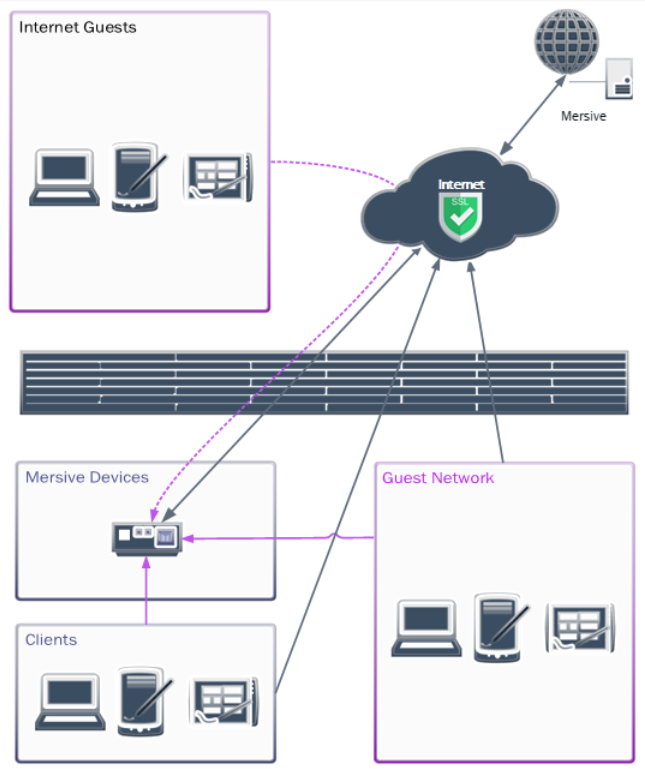
NAT Statement Examples
VLAN99 = External Internet Interface [200.200.200.1/29]
VLAN10 = Office LAN [10.0.0.1/24]
VLAN20 = Mersive Device LAN [10.1.0.1/24]
VLAN30 = Guest Network [192.168.0.1/24]
Note
Some firewalls may require updates or do not fully support STUN NAT forwarding. In Palo Alto firewalls, enable Persistent Dynamic IP and Port (DIPP) NAT forwarding. For Cisco IOS, this may require configuring STUN peering. Cisco Meraki routers fully support STUN. In highly restrictive networks, additional configurations or static port mapping may be required.
# NAT Traffic Inside to Outside Internet
SOURCE NAT VLAN10 to VLAN99
SOURCE NAT VLAN20 to VLAN99
SOURCE NAT VLAN30 to VLAN99

# Route Traffic Inside to Inside
SOURCE VLAN10 to VLAN20
SOURCE VLAN20 to VLAN10

# NAT Traffic Inside to Inside
SOURCE NAT VLAN20 to VLAN30
SOURCE NAT VLAN30 to VLAN20
Firewall ACL Rule Examples
For more restrictive networks, please review the provided URL and port table.
# Allow traffic from Mersive device and client hosting networks to the Internet
ALLOW FROM INSIDE ANY UDP 123 TO OUTSIDE ntp.mersive.com UDP 123
ALLOW FROM INSIDE ANY TCP-UDP 49152–65535 TO OUTSIDE ANY TCP-UDP 443
ALLOW FROM INSIDE ANY TCP-UDP 19302 TO OUTSIDE stun.l.google.com TCP-UDP 19302

# Allow sharing traffic between Mersive device and client hosting networks
ALLOW FROM VLAN10, VLAN30 TCP 32768-65535 TO VLAN20 7000-7001, 7100, 7236, 8008-8009, 8443
ALLOW FROM VLAN10, VLAN30 UDP 1900, 5353 TO VLAN20 UDP 1900, 5353
ALLOW FROM VLAN10, VLAN30 TCP-UDP 32768-65535 TO VLAN20 TCP-UDP 32768-65535
ALLOW FROM VLAN20 UDP 1900, 5353 TO VLAN10, VLAN30 UDP 1900, 5353
ALLOW FROM VLAN20 TCP-UDP 32768-65535 TO VLAN10, VLAN30 TCP-UDP 32768-65535

# [OPTIONAL] Allow DNS from internal networks to Internet if sourced from the Internet or from a server on another VLAN (e.g. 8.8.8.8 – Google DNS)
ALLOW FROM INSIDE ANY TCP-UDP 53 TO OUTSIDE TCP-UDP 53 or
ALLOW FROM VLAN20 TCP-UDP 53 TO VLAN10 TCP-UDP 53 and
ALLOW FROM VLAN30 TCP-UDP 53 TO OUTSIDE ANY TCP-UDP 53

# [OPTIONAL] Add to allow sharing traffic for Internet guest access to one device, a contiguous range, or the device network (/32 = 1 device, /27 = 30 devices)
ALLOW FROM OUTSIDE ANY UDP 32768-65535 TO VLAN20 UDP 32768-65535
ALLOW FROM OUTSIDE ANY UDP 32768-65535 TO VLAN20 10.0.2.244/27 UDP 32768-65535

# [OPTIONAL] Deny all other traffic between the networks hosting Mersive Devices.
DENY ALL FROM VLAN10 ANY TO VLAN20 ANY
DENY ALL FROM VLAN10 ANY TO VLAN30 ANY
DENY ALL FROM VLAN20 ANY TO ANY
DENY ALL FROM VLAN30 ANY TO VLAN10 ANY
DENY ALL FROM VLAN30 ANY TO VLAN20 ANY
DENY ALL FROM VLAN30 ANY TO VLAN30 ANY [Represents peer isolation]