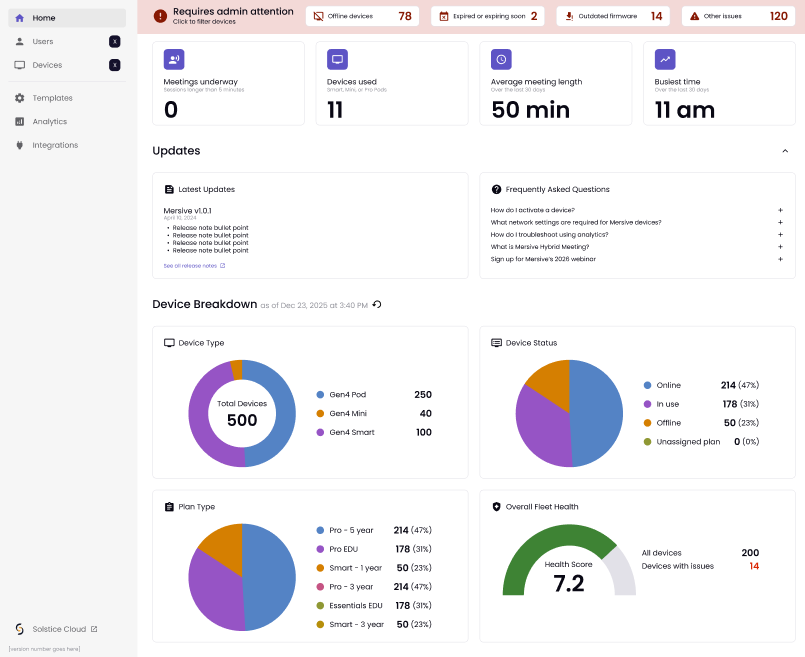
Home Page
The Admin home page contains charts that display useful monitoring data for administrators.
Red Alert Ribbon
On the home page, the red alert ribbon shows alerts to the Admin when pods need attention and appears only when metrics are available.
Offline devices: The number of devices that are offline.
Expired or expiring soon: The number of devices whose subscription has expired or will expire within 30 days.
Outdated firmware: Look for this in an upcoming release.
Other issues: Look for this in an upcoming release.
Summary
Immediately under the red ribbon alerts are four summary metrics:
Meetings underway: This number shows how many meetings are currently in progress.
Devices used: Displays how many devices are currently in use.
Average meeting length: The average duration of meetings in the last 30 days that lasted longer than 5 minutes. If the value is less than 60 minutes, it displays the minutes with no decimal places; if the value is 60 minutes or more, it displays the hours with up to 2 decimal places.
Busiest time: The hour of the day with the most meetings in the last 30 days.
Updates
The Updates section is coming soon.
Device Breakdown
This section includes four metrics that provide an overview of the organization’s fleet of activated devices.
Device Type: This pie chart shows the fleet split by Pod, Mini, and Smart devices.
Device Status: This pie chart shows the fleet split between online and offline devices.
Plan Type: This pie chart shows the fleet split by licenses.
Overall Fleet Health: This custom measure ranges from 0 to 10.
Calculated as (Total devices - Devices with issues) / (Total devices) * 10, rounded to 1 decimal place.
Devices with issues are offline devices and devices that are expired or expiring soon.